.png?width=200&height=90&name=logo-edist%20(1).png)
Note:
You will not be able to checkout if you have a pending tax exemption in the state that matches your billing or shipping address. Once the exemption is accepted or removed you will be able to checkout again.
If you purchase before you apply for a tax exemption, please contact your Value Added Reseller for more information.
All future invoices will be exempt once an approved tax exemption is on file.
1) Log into Dictation.Cloud and navigate to the Account > My Account option.
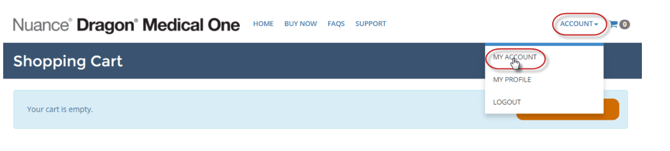
2) Then click on tax exempt.

3) Click the "choose files" button to upload your tax-exempt document.
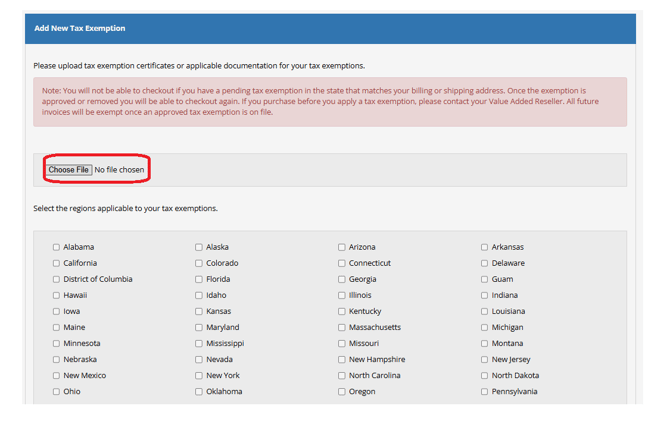
4) Select the state referenced in the uploaded tax exemption document and click <Submit>.
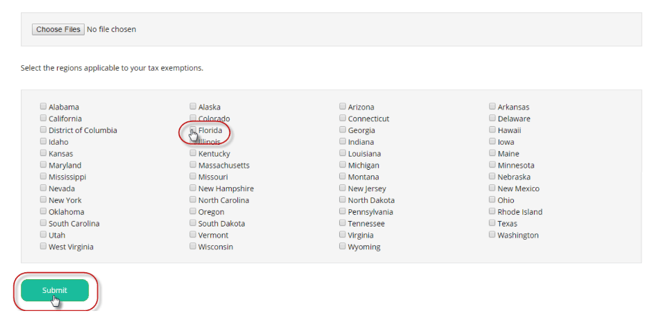
The tax exemption is now being reviewed and upon completion, the account will be updated.