.png?width=200&height=90&name=logo-edist%20(1).png)
1) A customer will send over a request via email or phone to disable their renewal for their order.
Please acquire written consent from a contact that's on the account, this must be the primary contact or from a subscriber as they are the only one with the authority to make changes to the account.
2) Once obtaining the consent please send a screenshot or attachment of the customer's email with the request to helpdesk@edist.com, please include the customer's email address in the screenshot.
Example:
From:<customers@email.com>
To:<JaneDoe@reseller.com>
To Whom it may concern,
Please disable the renewal for order: #00001 we are no longer needing the service. Please make sure the subscription does no renew.
3) The helpdesk will process this request and give you a date of expiration on the reply.
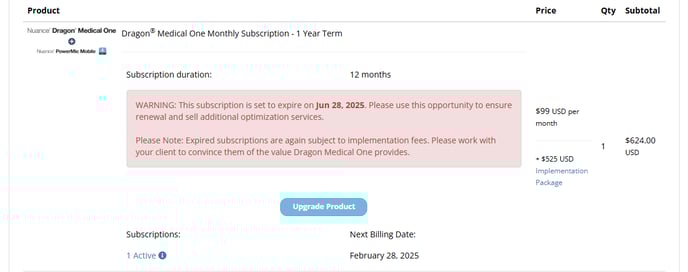
You can verify that the order's auto-renewal has been disabled. Simply go to the order page and scroll down and you will see the following notice: