.png?width=200&height=90&name=logo-edist%20(1).png)
You will have to configure Power Mic Mobile first before you can connect to Dragon.
Check out our other article here!
-
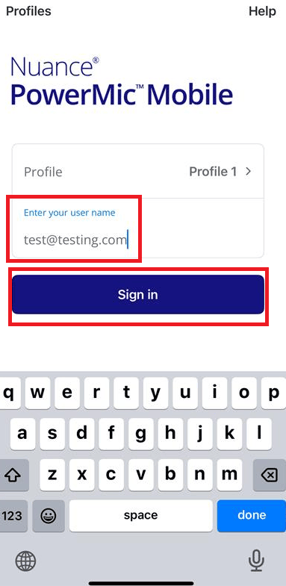
Open your Power Mic Mobile App on your phone.
- Enter your Dragon Medical One login username
- Click <Sign In>
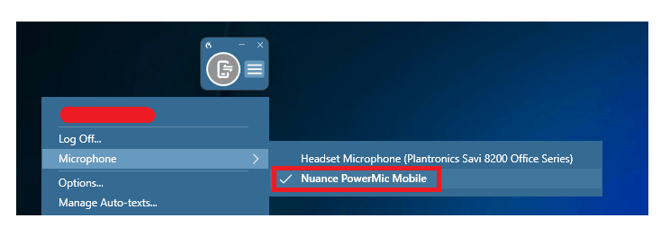
- On Dragon Medical One please select the <Microphone> option on your drop down menu.
- Select <PowerMic Mobile> as shown below:
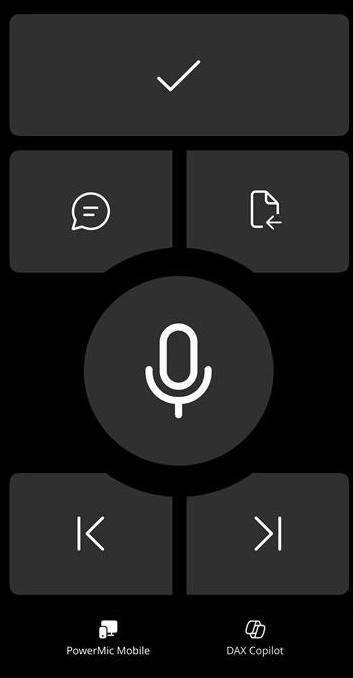
- When paired successfully a red cell phone will appear in Dragon Medical One and a large red button will appear in your cellular device as shown:

- Your Power Mic Mobile on your phone should also change:
If you are having issues pairing please exit out of Dragon Medical One and close out PowerMic Mobile on your phone and then try again.