.png?width=200&height=90&name=logo-edist%20(1).png)
The following steps occur as part of the order fulfillment process:
- The submitted CNEX order is processed and the subscription is activated.
- A Welcome Letter is provided by eDist, which includes the CNEX portal setup details and next steps for getting started.
- As long as GDAP access is available, eDist will complete the Dragon Admin Center setup steps during the activation process.
Enabling the CNEX Connector
Coordinate with the customer's Global Administrator to perform the following steps:
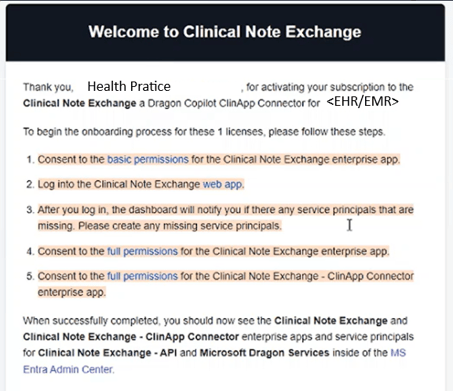
1. Follow the steps within the "Welcome to Clinical Note Exchange" email.
Important:
Please follow the steps in this email in chronological order.
Completing steps out of order may invalidate the process and require you to start over.
This welcome email, along with all included links, is unique to the customer organization and will not function across other tenants.
Here is an example of the Welcome email:
2. Complete EHR Specific Integration Steps and CNEX Portal Setup: